
Conversations
What is the Conversations tab?
Conversations opens Conversation Explorer. Admins can open it. Managers can open it unless the organization hides Conversations for managers.
A conversation is a series of consecutive messages in the same chat. A new conversation starts after more than 24 hours of silence, or when the business sends a template. While a case is escalated to an agent, a new conversation is not started.
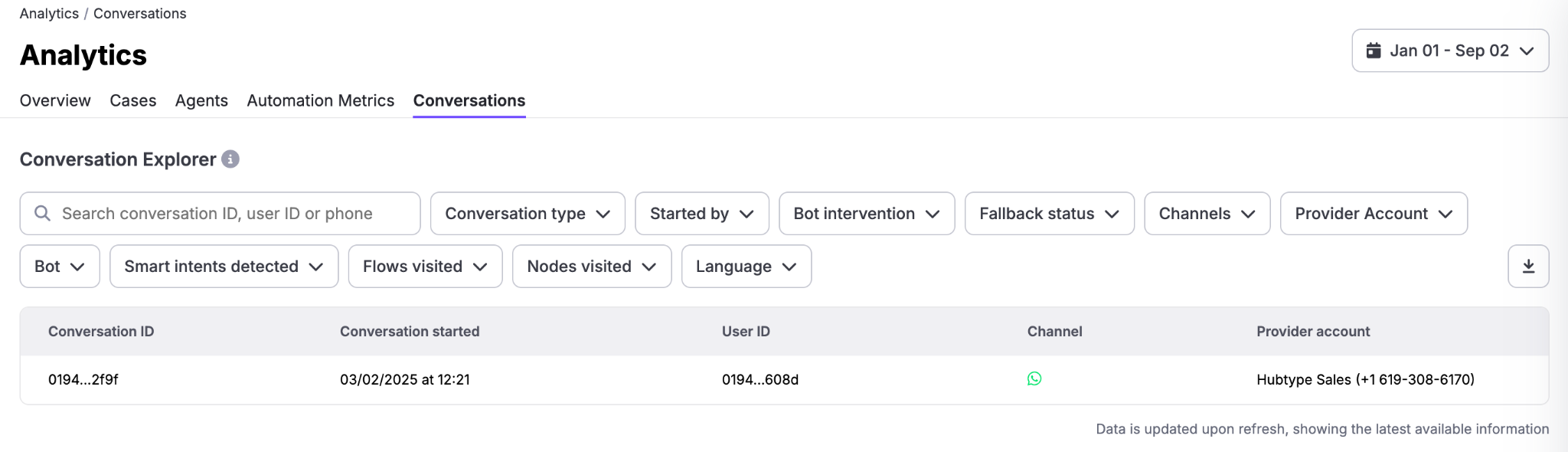
The table
Columns: Conversation ID, Conversation started, User ID, Channel, Country, Language, and Provider account.
A Test badge means Test conversation from staging environment.
Search by chat ID, conversation ID, phone number or BSUID.
Filters include Conversation type (Automation only or Handoff to agent), Started by (Customer or Business), Bot intervention, Fallback status (No fallback or Fallback), Channels, Provider Account, Bot, Smart intents detected, Flows visited, Nodes visited, Language, Country, Input guardrail, and Tool executed. Admins also see Environment, with Production and Test.
Open a conversation
Select a row to open the transcript. The side panel has:
- Conversation info: Conversation ID, Language, and Started by. Started by can be customer, agent, bot, or campaign.
- Automation info: Keywords, Intents, and Webviews. Empty values show Not detected.
- Contact data: Name, Channel ID, Phone Number, User ID, and Country.
- Conversation data: fields captured during the conversation. Use Add field to include one.
In Chat options, turn on Show debug events when you need the extra events behind a bot reply.
Download data. Only the first pages are included, because of file size limits. The CSV adds detail that the table does not show, including end-user, bot, and agent messages, fallback messages, successful knowledge base answers, smart intents, flows, and nodes.
Example
A manager filters Handoff to agent and a date range, then opens a few transcripts to see the user message that the bot could not handle. Show debug events shows the guardrail or tool behind that reply.