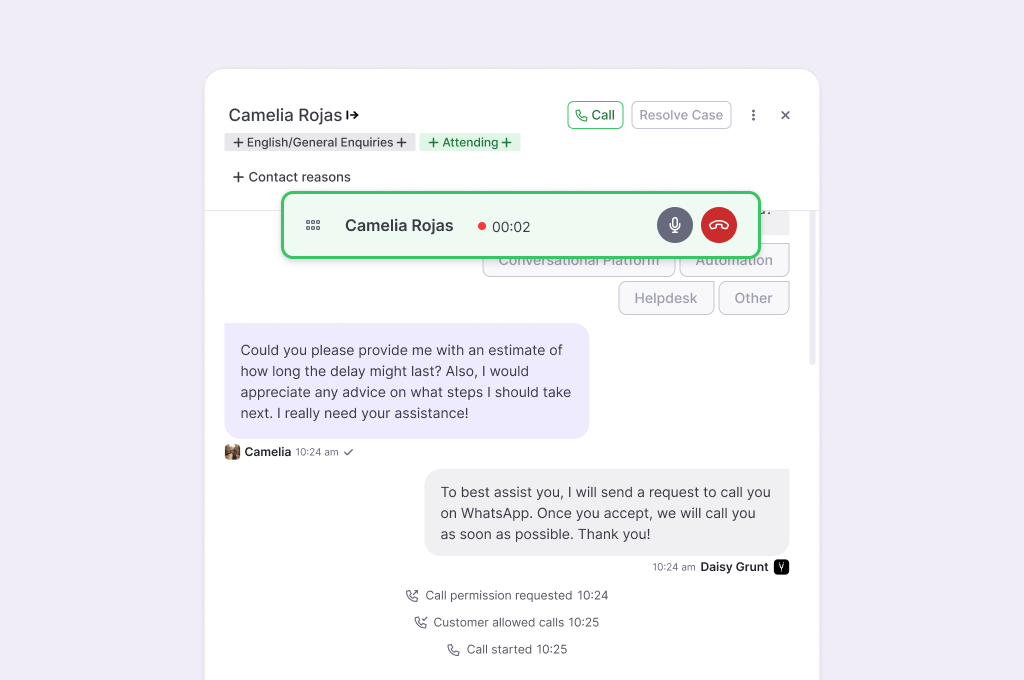
WhatsApp Outbound Calls
What is it?
The WhatsApp Outbound Calls lets agents place outbound voice calls to customers directly from WhatsApp, without leaving the conversation, and keep sending messages during the call.
It's built entirely on Meta's own permission framework — the customer explicitly grants (and can revoke) a call permission request, every call is recorded only after a legal notice, and every call is auditable in Call Logs section. Transcript capability is available on demand.
- Purpose: Lets agents resolve cases by voice without leaving WhatsApp.
- Value: Let agents resolve sensitive or high-effort cases by voice without leaving WhatsApp, all within the channel the customer already opened.
- Scope: This feature covers agent-initiated outbound calls only.
Key Concepts
- Trust & compliance: The customer explicitly grants (and can revoke) permission, every call is recorded only after a legal notice, and every call is auditable in Call Logs.
- Expectations: Phase 1 is outbound calls-only, one active call per agent.
- Recording feature: Automatically enabled for all calls & auditable within Call Logs section.
- Transcript feature: Each client can decide to enable or not this feature.
Happy Path. The flow at a glance
- Agent requests a Call Permission (a pre-approved Meta template) from the case header
- The customer receives a pre-approved WhatsApp template asking if they'll allow calls
- Customer responds — accepting temporarily (7 days). permanently, decline or don't respond
- Once permission is granted, the call button is enabled — the agent can place the call from the case
- When the call begins, both participants hear a short legally required announcement before the recording begins.
- During the call, the call widget stays visible anywhere in the panel. Agents can mute themselves; recording starts automatically once the legal notice has played.
- After the call, a summary (date/time and duration) appears in the chat, and the full record appears in Call Logs (recording, metadata, and a link back to the case).
- Call Logs record the call — accessible exclusively to Managers/Admins.
What to Expect
If the customer doesn't answer twice, Meta automatically sends them a reconsideration message; after 4 unanswered calls, Meta automatically revokes the permission and the agent needs to request it again.