Custom Conditions, Case Panel Redesign, First Assigned Time & Media Filters
✨ What's new?
Advanced Custom Conditions in Flow Builder
Custom conditionals in Flow Builder just got a logical upgrade, moving far beyond basic "equals" matches! Now you can build highly granular, data-specific branching logic natively inside your conversational canvas without writing a single line of code:
- String Evaluation: Match text variables using advanced operators like Contain, Does not contain, Equals, Start with, or End with.
- Precise Number Ranges: Create numeric rules with Equals, Not equals, Greater than, Less than, or Between (which utilizes minimum and maximum validation fields, ensuring your configured range is always valid).
- Boolean & Definition Checks: Effortlessly evaluate True or False states, or verify if a specific variable is defined the moment a user passes through the flow.
- Guardrails & Validation: To keep your flows running flawlessly, we've built in real-time error validation for decimal places and invalid text inputs, alongside a clear notification if a variable used in your flow is no longer passed into the bot.
Technical Requirement: To unlock this upgraded edit panel and its new operators, please ensure your bot is updated and deployed using Botonic minor version 51.
Media-Based Case Filtering
Managing and locating multi-media interactions in your messages list just got much easier! We've introduced a new pack of media filters to help your agents quickly sort through messages.
- Filter by Media Type: You can now instantly filter your live case list to view conversations containing Audio, Video, Document, or Image files.
- End-User Focused: To maximize operational sorting accuracy, these filters look exclusively for media files sent by the customer. Attachments uploaded or shared by your agents will not trigger the filter, keeping your monitoring workspace completely clean.
⚡️ Improvements
ging and locating multi-media interactions in your messages list just got much easier! We've introduced a new pack of media filters to help your agents quickly sort through messages.
- Filter by Media Type: You can now instantly filter your live case list to view conversations containing Audio, Video, Document, or Image files.
- End-User Focused: To maximize operational sorting accuracy, these filters look exclusively for media files sent by the customer. Attachments uploaded or shared by your agents will not trigger the filter, keeping your monitoring workspace completely clean.
⚡️ Improvements
'Case First Assigned Time' Field in Archive Exports
To support operational deep-dives and performance calculations, we've added a new Case first assigned time timestamp field to your Case Archive CSV exports.
- This field captures the exact timestamp of when a case was assigned to a human agent for the very first time.
- To safeguard your historical reporting data, this value is permanently locked upon initial creation and will not overwrite or refill if a case is reopened.
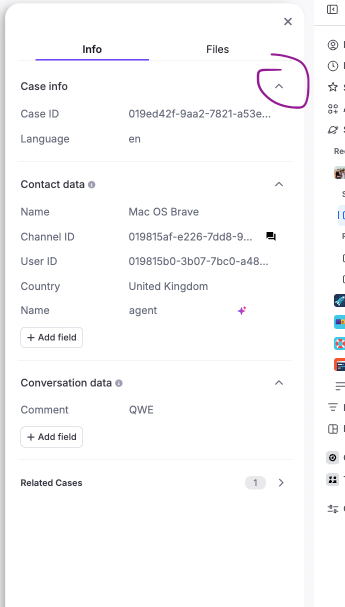
Redesigned Case Panel in Conversation Explorer
We’ve brought the redesigned Side Case Panel over to Conversation Explorer so you get the exact same look and feel everywhere. Information is now structured in a clear and scannable way:
- Conversation Info: Pinned fields at the top for immediate context (Conversation ID, Language, and Started by).
- Automation Info: A smart view with automation details detected.
- Contact & Conversation Data: Fully interactive fields. You can edit or delete info on the fly, just like you do in the live Inbox workspace.
*Tooltip: Use the chevron/arrow (v) next to each section header to collapse or expand it, so you can focus on the info that matters and hide the rest.
*Reference