
Campaigns: guided setup and drafts
✨ What's new?
Create campaigns with more confidence
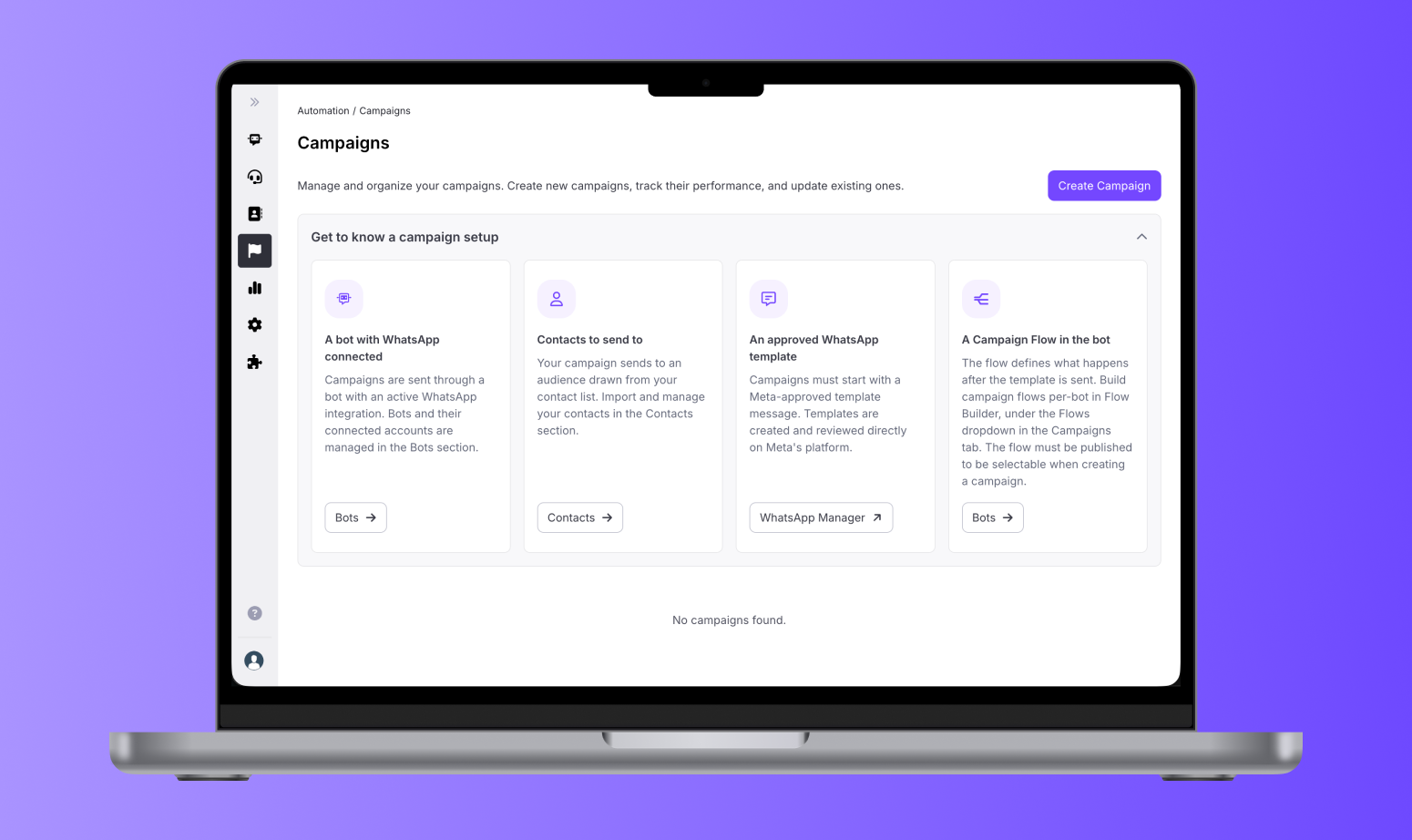
We've improved campaign creation with a guided setup experience and the ability to save drafts.
You can now follow a step-by-step process that helps you configure everything needed before launching a campaign, with clear guidance and direct access to the required setup areas.
You can also save your campaign as a draft at any point and continue working on it later without losing your progress.
→ Why this matters
This new experience makes campaign creation simpler, reduces setup friction, and helps you launch campaigns with more confidence.
⚡️ Improvements
Smoother contact browsing
We've replaced button-based pagination in the Contacts list with infinite scroll. You can now browse large contact lists more smoothly without manually navigating between pages.
Clearer channel identification
The Facebook Messenger channel now displays its correct icon in the Contacts section, improving consistency across your channel integrations.
🛠️ Bug Fixes
Better visibility when testing AI Agents
We fixed an issue that could prevent large AI Agent debug and preview events from appearing correctly in the Flow Builder webchat preview. You can now see the complete preview information when testing and troubleshooting AI-powered experiences, without events being dropped due to size limitations.