
Apply one queue's schedule and exceptions to other queues
Copy one queue's weekly hours and exceptions to other queues, so you do not enter the same schedule again.
Who can use it
Admins and managers.
The queue you copy from needs weekly hours or at least one exception.
How to apply a schedule to other queues
Save the schedule on this queue first. Set Status to Scheduled, choose the days in Active days and the hours in Active hours, and add an exception only if you need one. Then select Save changes and Confirm changes.
- In the navigation bar, select Settings.
- Open Projects, open the project, then open the queue and Queue settings.
- Select Apply schedule to other queues.
- Select Weekly schedule, Exceptions, or both, then select Next.
- Select the queues.
- Select Review & apply, then Confirm & apply.
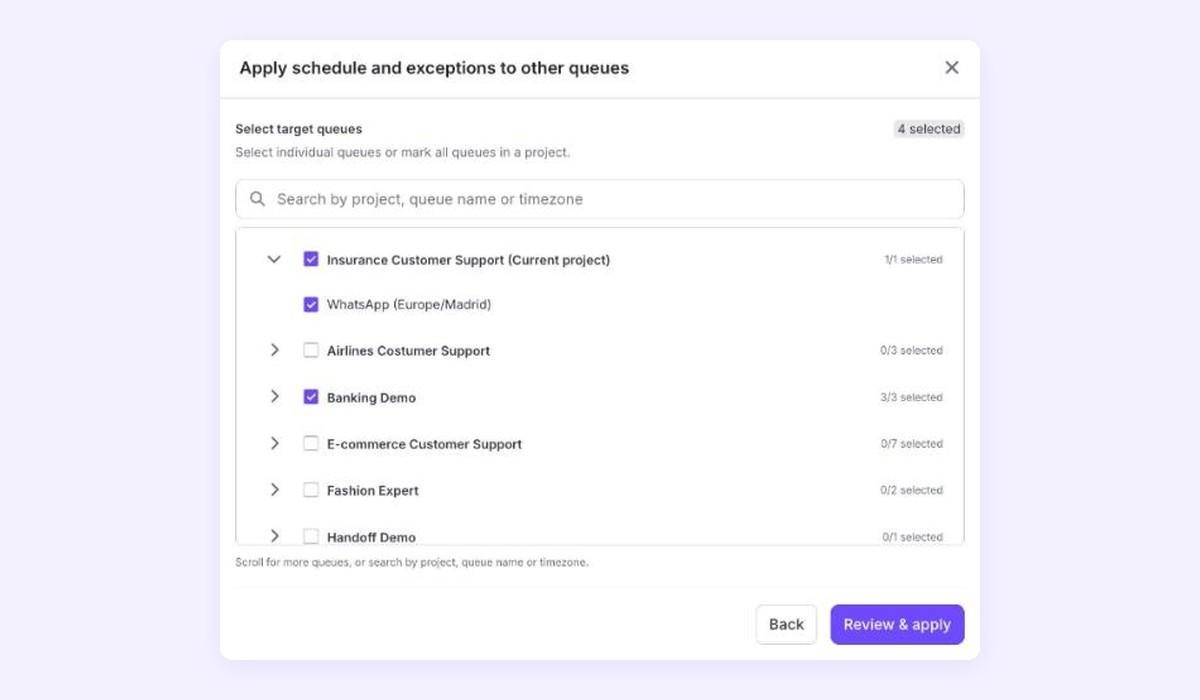
When every queue is updated, you see Schedule changes applied to the selected queues.
Good to know
- If you still have unsaved changes, Apply schedule to other queues stays off and the hint says Save your current changes to apply schedule to other queues. If the queue has no hours or exceptions, the hint says Configure schedule to apply it to other queues.
- After you save a schedule change, the confirmation can also offer Apply to other queues.
- Timezones are not changed. Hours and dates are applied in each queue's own timezone.
- Mode Status is not copied. A queue set to Always open or Always closed does not use the copied schedule, so those hours do not decide when that queue is open.
- A new exception does not repeat until you turn on Apply every year. You cannot save two exceptions for the same day and month when one of them repeats every year, or when both are for the same year.
- You only see queues in projects you manage. If none match, you see There are no other queues available. If the list fails to load, you see Queues could not be loaded. Close this dialog and try again.
- If only some queues update, the message tells you how many were updated and names the ones that could not be updated. If none update, you see Could not update these queues: followed by their names.